likko-liu's blog

一些个人经验、感悟、心得,愿共勉

0%

使用 VSCode 替代 keil 进行 STM32 开发

0. 背景

经历了之前使用 STM32CubeIDE for VSCode 进行 STM32 开发,使用该插件直接在 VSCode 中通过 ST-Link / J-Link 对 STM32 目标板进行 Debug,实现就和 Keil5 一样的效果(外设及特殊处理寄存器信息、堆栈信息等都可以选择查看)。后续又探索出在 macOS 中仅用 VSCode 编辑器 + ARM 工具链,配合 J-Link 调试器进行 STM32 开发的方法,该方法与使用 STM32CubeIDE for VSCode 相比优点在于更灵活可控。

依赖:

  • 一块 STM32 开发板 + J-Link 调试器(J-Link-OB 的板子也行;本文未覆盖 ST-Link / OpenOCD 路径)
  • STM32CubeMX(用于生成 CMake 工程;下载需 ST 账号)

1. 工具链

1.1 ARM 工具链

安装交叉编译工具 gcc-arm-embedded,其自带 GCC 15.2.1 + binutils + GDB + newlib。

1
brew install --cask gcc-arm-embedded

验证:

1
2
3
4
5
6
7
8
9
arm-none-eabi-gcc --version
# 期望:arm-none-eabi-gcc (Arm GNU Toolchain 15.2.Rel1 (Build arm-15.86)) 15.2.1 20251203

which arm-none-eabi-gcc
# 期望:/opt/homebrew/bin/arm-none-eabi-gcc

# 检查 newlib 头文件
ls /Applications/ArmGNUToolchain/15.2.rel1/arm-none-eabi/arm-none-eabi/include/stdint.h
# 期望:文件存在

1.2 调试工具

安装 SEGGER J-Link 软件及驱动。

1
brew install --cask segger-jlink

验证:

1
2
3
4
5
6
7
8
which JLinkExe JLinkGDBServer
# 期望都在 /usr/local/bin/ 下

JLinkExe 2>&1 <<EOF
ShowEmuList
q
EOF
# 如果已连接调试器,期望看到 J-Link,带 USB 串号

1.3 构建工具

1
brew install cmake ninja

验证:

1
2
cmake --version    # 期望 >= 3.22
ninja --version # 期望 >= 1.10

2. 工程新建及初始编译验证

  • 打开 STM32CubeMX;
  • 选择芯片型号;
  • 配置引脚、时钟、外设;
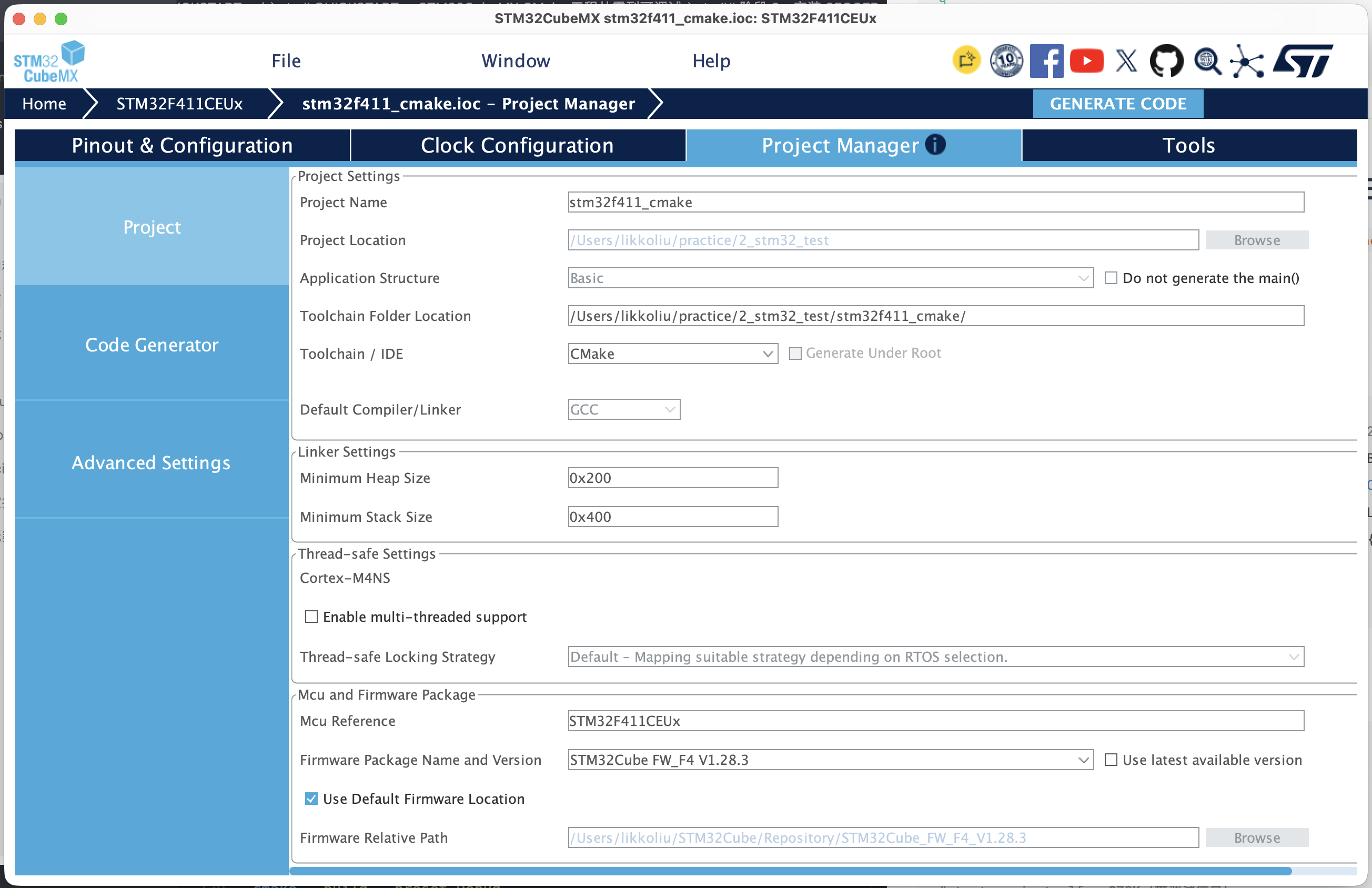
  • Project Manager 设置:
    • Toolchain / IDE: 选择 CMake
    • Project Location: 选择你的工作目录
  • 点击 Generate Code;
  • 在 VS Code 中打开生成的项目文件夹。

* Project Manager 设置示意

注意:在配置时,先勿勾选低功耗配置,即将所有引脚配置为模拟模式,这样将会失能掉 SWD 功能,导致后续在调试时无法正常进行,仅能重新擦除芯片 flash 进行恢复。

CubeMX 生成的 CMake 默认只产 .elf,烧录用的 .bin 和 .hex 需要手动加。 主 CMakeLists.txt 文件末尾的 target_link_libraries 之后,追加:

1
2
3
4
5
6
7
# Generate .hex and .bin for flashing 
add_custom_command(TARGET ${CMAKE_PROJECT_NAME} POST_BUILD
COMMAND ${CMAKE_OBJCOPY} -O ihex $<TARGET_FILE:${CMAKE_PROJECT_NAME}> ${CMAKE_PROJECT_NAME}.hex
COMMAND ${CMAKE_OBJCOPY} -O binary -S $<TARGET_FILE:${CMAKE_PROJECT_NAME}> ${CMAKE_PROJECT_NAME}.bin
COMMENT "Building ${CMAKE_PROJECT_NAME}.hex and ${CMAKE_PROJECT_NAME}.bin"
VERBATIM
)

验证:

1
2
cmake --preset Debug
cmake --build --preset Debug

期望:

1
2
3
4
5
6
7
8
9
10
11
12
13
14
15
16
17
18
19
20
21
22
23
24
likkoliu@likkodeMacBook-Pro stm32f411_cmake % cmake --preset Debug
-- The C compiler identification is GNU 15.2.1
-- The CXX compiler identification is GNU 15.2.1
-- Detecting C compiler ABI info
-- Detecting C compiler ABI info - done
-- Check for working C compiler: /opt/homebrew/bin/arm-none-eabi-gcc - skipped
-- Detecting C compile features
-- Detecting C compile features - done
-- Detecting CXX compiler ABI info
-- Detecting CXX compiler ABI info - done
-- Check for working CXX compiler: /opt/homebrew/bin/arm-none-eabi-g++ - skipped
-- Detecting CXX compile features
-- Detecting CXX compile features - done
Build type: Debug
-- The ASM compiler identification is GNU
-- Found assembler: /opt/homebrew/bin/arm-none-eabi-gcc
-- Configuring done (0.5s)
-- Generating done (0.0s)
-- Build files have been written to: /Users/likkoliu/practice/2_stm32_test/stm32f411_cmake/build/Debug
likkoliu@likkodeMacBook-Pro stm32f411_cmake % cmake --build --preset Debug
[22/22] Linking C executable stm32f411_cmake.elf; Building stm32f411_cmake.hex and stm32f411_cmake.bin
Memory region Used Size Region Size %age Used
RAM: 20344 B 128 KB 15.52%
FLASH: 13328 B 512 KB 2.54%

3. vscode 集成

3.1. 必要扩展

  • cortex-debug — ARM GDB 调试入口
  • cmake-tools — CMake 集成(识别 CMakePresets.json)

3.2. 配置文件

本工程下配置 cortex-debug、cmake-tools

编辑 .vscode/settings.json

1
2
3
4
5
6
7
8
9
10
11
12
13
14
{
"cmake.cmakePath": "/opt/homebrew/bin/cmake",
"cmake.generator": "Ninja",
"cmake.buildDirectory": "${workspaceFolder}/build/Debug",
"cmake.configurePreset": "Debug",
"cmake.buildPreset": "Debug",
"cmake.configureOnOpen": false,
"cmake.autoBuild": false,

"C_Cpp.intelliSenseEngine": "default",

"cortex-debug.armToolchainPath": "/Applications/ArmGNUToolchain/15.2.rel1/arm-none-eabi/bin",
"cortex-debug.JLinkGDBServerPath": "/usr/local/bin/JLinkGDBServer"
}

编辑 .vscode/c_cpp_properties.json

1
2
3
4
5
6
7
8
9
10
11
12
13
14
{
"configurations": [
{
"name": "STM32F411 (Debug)",
"compileCommands": "${workspaceFolder}/build/Debug/compile_commands.json",
"configurationProvider": "ms-vscode.cmake-tools",
"intelliSenseEngine": "default",
"compilerPath": "/opt/homebrew/bin/arm-none-eabi-gcc",
"cStandard": "c11",
"cppStandard": "c++17"
}
],
"version": 4
}

编辑 .vscode/launch.json

1
2
3
4
5
6
7
8
9
10
11
12
13
14
15
16
17
18
19
20
21
22
23
24
25
26
27
28
29
30
31
32
33
34
35
36
37
38
39
40
41
42
43
44
45
46
47
48
49
50
51
52
53
54
55
56
57
{
"version": "0.2.0",
"configurations": [
{
"name": "Cortex-Debug: J-Link STM32F411",
"cwd": "${workspaceRoot}",
"executable": "${workspaceRoot}/build/Debug/stm32f411_cmake.elf",
"request": "launch",
"type": "cortex-debug",
"runToEntryPoint": "main",
"servertype": "jlink",
"jlinkPath": "/usr/local/bin/JLinkGDBServer",
"interface": "swd",
"device": "STM32F411CE",
"speed": 15000,
"preLaunchTask": "Build (Debug)",
"postDebugTask": "Reset and Halt",
"armToolchainPath": "/Applications/ArmGNUToolchain/15.2.rel1/arm-none-eabi/bin",
"liveWatch": { "enabled": true, "samplesPerSecond": 4 },
"rtos": "FreeRTOS",
"rtosConfig": {
"systemViewItem": "uxTopUsedPriority"
}
},
{
"name": "Cortex-Debug: J-Link (Attach)",
"cwd": "${workspaceRoot}",
"executable": "${workspaceRoot}/build/Debug/stm32f411_cmake.elf",
"request": "attach",
"type": "cortex-debug",
"servertype": "jlink",
"jlinkPath": "/usr/local/bin/JLinkGDBServer",
"interface": "swd",
"device": "STM32F411CE",
"speed": 15000,
"armToolchainPath": "/Applications/ArmGNUToolchain/15.2.rel1/arm-none-eabi/bin",
"liveWatch": { "enabled": true, "samplesPerSecond": 4 },
"rtos": "FreeRTOS"
},
{
"name": "Cortex-Debug: J-Link (Flash + Reset)",
"cwd": "${workspaceRoot}",
"executable": "${workspaceRoot}/build/Debug/stm32f411_cmake.elf",
"request": "launch",
"type": "cortex-debug",
"runToEntryPoint": "main",
"servertype": "jlink",
"jlinkPath": "/usr/local/bin/JLinkGDBServer",
"interface": "swd",
"device": "STM32F411CE",
"speed": 15000,
"preLaunchTask": "Flash (J-Link)",
"armToolchainPath": "/Applications/ArmGNUToolchain/15.2.rel1/arm-none-eabi/bin",
"rtos": "FreeRTOS"
}
]
}
创建自定义任务

编辑.vscode/tasks.json

1
2
3
4
5
6
7
8
9
10
11
12
13
14
15
16
17
18
19
20
21
22
23
24
25
26
27
28
29
30
31
32
33
34
35
36
37
38
39
40
41
42
43
44
45
46
47
48
49
50
51
52
{
"version": "2.0.0",
"tasks": [
{
"label": "Configure (Debug)",
"type": "shell",
"command": "cmake",
"args": ["--preset", "Debug"],
"options": { "cwd": "${workspaceFolder}" },
"problemMatcher": [],
"presentation": { "reveal": "always", "panel": "shared" }
},
{
"label": "Build (Debug)",
"type": "shell",
"command": "cmake --preset Debug && cmake --build --preset Debug",
"options": { "cwd": "${workspaceFolder}" },
"group": "build",
"problemMatcher": ["$gcc"],
"presentation": { "reveal": "always", "panel": "shared" }
},
{
"label": "Build (Release)",
"type": "shell",
"command": "cmake --preset Release && cmake --build --preset Release",
"options": { "cwd": "${workspaceFolder}" },
"problemMatcher": ["$gcc"]
},
{
"label": "Clean build",
"type": "shell",
"command": "rm -rf build",
"options": { "cwd": "${workspaceFolder}" },
"problemMatcher": ["$gcc"]
},
{
"label": "Flash (J-Link)",
"type": "shell",
"command": "JLinkExe -device STM32F411CE -if SWD -speed 15000 -autoconnect 1 -CommanderScript ${workspaceFolder}/.vscode/flash.jlink",
"options": { "cwd": "${workspaceFolder}" },
"problemMatcher": [],
"presentation": { "reveal": "always", "panel": "shared" }
},
{
"label": "Reset and Halt",
"type": "shell",
"command": "JLinkExe -device STM32F411CE -if SWD -speed 15000 -autoconnect 1 -CommanderScript ${workspaceFolder}/.vscode/reset.jlink",
"options": { "cwd": "${workspaceFolder}" },
"problemMatcher": []
}
]
}
烧录脚本

编辑 .vscode/flash.jlink

1
2
3
4
5
6
// J-Link Commander script: flash stm32f411_cmake.bin to STM32F411
// Usage: JLinkExe -device STM32F411CE -if SWD -speed 15000 -autoconnect 1 -CommanderScript flash.jlink
loadfile build/Debug/stm32f411_cmake.bin 0x08000000
r
g
exit
复位脚本

编辑.vscode/reset.jlink

1
2
3
4
5
6
// J-Link Commander script: halt and reset target
// Usage: JLinkExe -device STM32F411CE -if SWD -speed 15000 -autoconnect 1 -CommanderScript reset.jlink
h
r
h
exit

4. 编译验证

在 vscode 中打开工程文件夹

  1. ⇧⌘P → Developer: Reload Window
  2. ⇧⌘P → Tasks: Run TaskCMake → Clean build(清理旧缓存)
  3. ⇧⌘P → Tasks: Run TaskCMake → Build (Debug)

期望:

1
2
3
4
5
6
7
8
9
10
11
12
13
14
15
16
17
18
19
20
21
22
23
24
25
26
27
28
29
30
 *  正在执行任务: rm -rf build 

* 终端将被任务重用,按任意键关闭。

* 正在执行任务: cmake --preset Debug && cmake --build --preset Debug

-- The C compiler identification is GNU 15.2.1
-- The CXX compiler identification is GNU 15.2.1
-- Detecting C compiler ABI info
-- Detecting C compiler ABI info - done
-- Check for working C compiler: /opt/homebrew/bin/arm-none-eabi-gcc - skipped
-- Detecting C compile features
-- Detecting C compile features - done
-- Detecting CXX compiler ABI info
-- Detecting CXX compiler ABI info - done
-- Check for working CXX compiler: /opt/homebrew/bin/arm-none-eabi-g++ - skipped
-- Detecting CXX compile features
-- Detecting CXX compile features - done
Build type: Debug
-- The ASM compiler identification is GNU
-- Found assembler: /opt/homebrew/bin/arm-none-eabi-gcc
-- Configuring done (0.2s)
-- Generating done (0.0s)
-- Build files have been written to: /Users/likkoliu/practice/2_stm32_test/stm32f411_cmake/build/Debug
[22/22] Linking C executable stm32f411_c...m32f411_cmake.hex and stm32f411_cmake.bin
Memory region Used Size Region Size %age Used
RAM: 20344 B 128 KB 15.52%
FLASH: 13328 B 512 KB 2.54%
* 终端将被任务重用,按任意键关闭。

5. 烧录调试

烧录

  1. 连接 J-Link 及其目标开发板
  2. ⇧⌘P → Tasks: Run TaskCMake → Flash (J-Link)

期望:

1
2
3
4
5
6
7
8
9
10
11
12
13
14
15
16
17
18
19
20
21
22
23
24
25
26
27
28
29
30
31
32
33
34
35
36
37
38
39
40
41
42
43
44
45
46
47
48
49
50
51
52
53
54
55
56
57
58
59
60
61
62
63
64
65
66
67
68
69
70
71
72
73
CommanderScript /Users/likkoliu/practice/2_stm32_test/stm32f411_cmake/.vscode/flash.jlink 

SEGGER J-Link Commander V9.58 (Compiled Jul 9 2026 16:00:41)
DLL version V9.58, compiled Jul 9 2026 15:59:54


J-Link Command File read successfully.
Processing script file...
J-Link>loadfile build/Debug/stm32f411_cmake.bin 0x08000000
J-Link connection not established yet but required for command.
Connecting to J-Link ...O.K.
Firmware: J-Link Pro V4 V13 PLUS Dec compiled 9 2041 12:59:59
Hardware version: V13.00
J-Link uptime (since boot): 0d 01h 07m 23s
S/N: 609020110
License(s): RDI,FlashBP,FlashDL,JFlash,GDB
USB speed mode: High speed (480 MBit/s)
IP-Addr: 255.255.255.255 (DHCP)
VTref=3.342V
Target connection not established yet but required for command.
Device "STM32F411CE" selected.


Connecting to target via SWD
InitTarget() start
SWD selected. Executing JTAG -> SWD switching sequence.
DAP initialized successfully.
InitTarget() end - Took 4.98ms
Found SW-DP with ID 0x2BA01477
DPIDR: 0x2BA01477
CoreSight SoC-400 or earlier
Scanning AP map to find all available APs
AP[1]: Stopped AP scan as end of AP map has been reached
AP[0]: AHB-AP (IDR: 0x24770011, ADDR: 0x00000000)
Iterating through AP map to find AHB-AP to use
AP[0]: Core found
AP[0]: AHB-AP ROM base: 0xE00FF000
CPUID register: 0x410FC241. Implementer code: 0x41 (ARM)
Found Cortex-M4 r0p1, Little endian.
FPUnit: 6 code (BP) slots and 2 literal slots
CoreSight components:
ROMTbl[0] @ E00FF000
[0][0]: E000E000 CID B105E00D PID 000BB00C SCS-M7
[0][1]: E0001000 CID B105E00D PID 003BB002 DWT
[0][2]: E0002000 CID B105E00D PID 002BB003 FPB
[0][3]: E0000000 CID B105E00D PID 003BB001 ITM
[0][4]: E0040000 CID B105900D PID 000BB9A1 TPIU
[0][5]: E0041000 CID B105900D PID 000BB925 ETM
Memory zones:
Zone: "Default" Description: Default access mode
Cortex-M4 identified.
'loadfile': Performing implicit reset & halt of MCU.
Reset type: NORMAL (https://kb.segger.com/J-Link_Reset_Strategies)
Reset: Halt core after reset via DEMCR.VC_CORERESET.
Reset: Reset device via AIRCR.SYSRESETREQ.
Downloading file [build/Debug/stm32f411_cmake.bin]...
J-Link: Flash download: Bank 0 @ 0x08000000: 1 range affected (16384 bytes)
J-Link: Flash download: Total: 0.407s (Prepare: 0.026s, Compare: 0.082s, Erase: 0.228s, Program: 0.050s, Verify: 0.008s, Restore: 0.010s)
J-Link: Flash download: Program & Verify speed: 271 KB/s
O.K.
J-Link>r
Reset delay: 0 ms
Reset type: NORMAL (https://kb.segger.com/J-Link_Reset_Strategies)
Reset: Halt core after reset via DEMCR.VC_CORERESET.
Reset: Reset device via AIRCR.SYSRESETREQ.
J-Link>g
Memory map 'after startup completion point' is active
J-Link>exit

Script processing completed.

OnDisconnectTarget() start
OnDisconnectTarget() end - Took 305us

调试

下载目标芯片对应的 .svd 文件(用于在调试时查看外设寄存器),可通过 ST 官网下载,也可通过 VSCode 扩展 STM32 SVD Downloader 下载。

下载完成后将其地址填入 launch.json 文件配置中。

1
2
3
4
5
6
7
8
9
10
11
12
13
14
15
16
17
18
19
20
21
22
23
24
25
26
27
28
29
30
31
32
33
34
35
36
37
38
39
40
41
42
43
44
45
46
47
48
49
50
51
52
53
54
55
56
57
58
59
60
{
"version": "0.2.0",
"configurations": [
{
"name": "Cortex-Debug: J-Link STM32F411",
"cwd": "${workspaceRoot}",
"executable": "${workspaceRoot}/build/Debug/stm32f411_cmake.elf",
"request": "launch",
"type": "cortex-debug",
"runToEntryPoint": "main",
"servertype": "jlink",
"jlinkPath": "/usr/local/bin/JLinkGDBServer",
"interface": "swd",
"device": "STM32F411CE",
"speed": 15000,
"preLaunchTask": "Build (Debug)",
"postDebugTask": "Reset and Halt",
"armToolchainPath": "/Applications/ArmGNUToolchain/15.2.rel1/arm-none-eabi/bin",
"liveWatch": { "enabled": true, "samplesPerSecond": 4 },
"rtos": "FreeRTOS",
"svdFile": "${workspaceRoot}/STM32F411.svd",
"rtosConfig": {
"systemViewItem": "uxTopUsedPriority"
}
},
{
"name": "Cortex-Debug: J-Link (Attach)",
"cwd": "${workspaceRoot}",
"executable": "${workspaceRoot}/build/Debug/stm32f411_cmake.elf",
"request": "attach",
"type": "cortex-debug",
"servertype": "jlink",
"jlinkPath": "/usr/local/bin/JLinkGDBServer",
"interface": "swd",
"device": "STM32F411CE",
"speed": 15000,
"armToolchainPath": "/Applications/ArmGNUToolchain/15.2.rel1/arm-none-eabi/bin",
"liveWatch": { "enabled": true, "samplesPerSecond": 4 },
"svdFile": "${workspaceRoot}/STM32F411.svd",
"rtos": "FreeRTOS"
},
{
"name": "Cortex-Debug: J-Link (Flash + Reset)",
"cwd": "${workspaceRoot}",
"executable": "${workspaceRoot}/build/Debug/stm32f411_cmake.elf",
"request": "launch",
"type": "cortex-debug",
"runToEntryPoint": "main",
"servertype": "jlink",
"jlinkPath": "/usr/local/bin/JLinkGDBServer",
"interface": "swd",
"device": "STM32F411CE",
"speed": 15000,
"preLaunchTask": "Flash (J-Link)",
"armToolchainPath": "/Applications/ArmGNUToolchain/15.2.rel1/arm-none-eabi/bin",
"svdFile": "${workspaceRoot}/STM32F411.svd",
"rtos": "FreeRTOS"
}
]
}
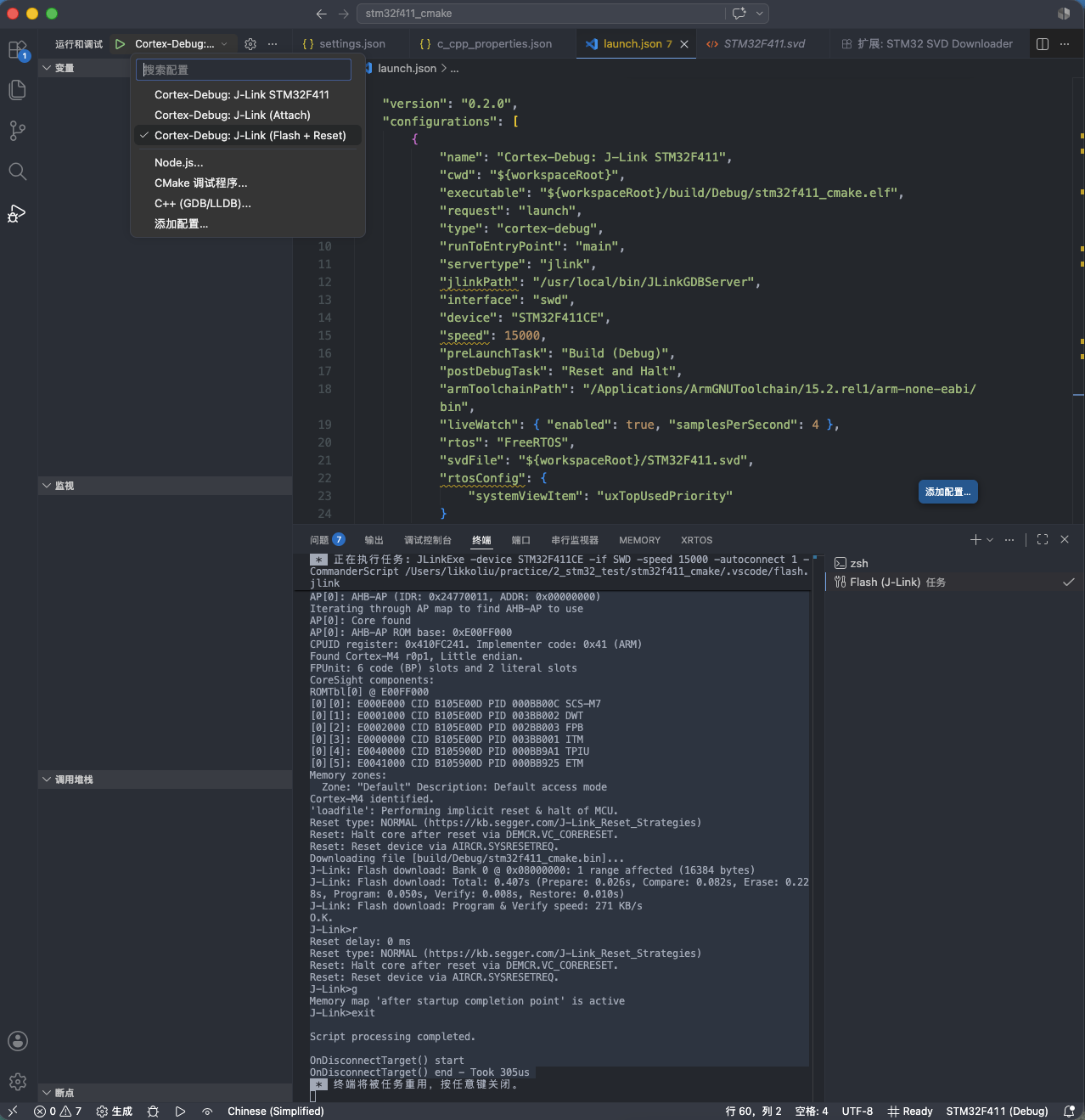
  1. 连接 J-Link 及其目标开发板
  2. ⇧⌘D 顶部下拉菜单选 Cortex-Debug: J-Link (Flash + Reset) 开始调试

* debug 入口示意

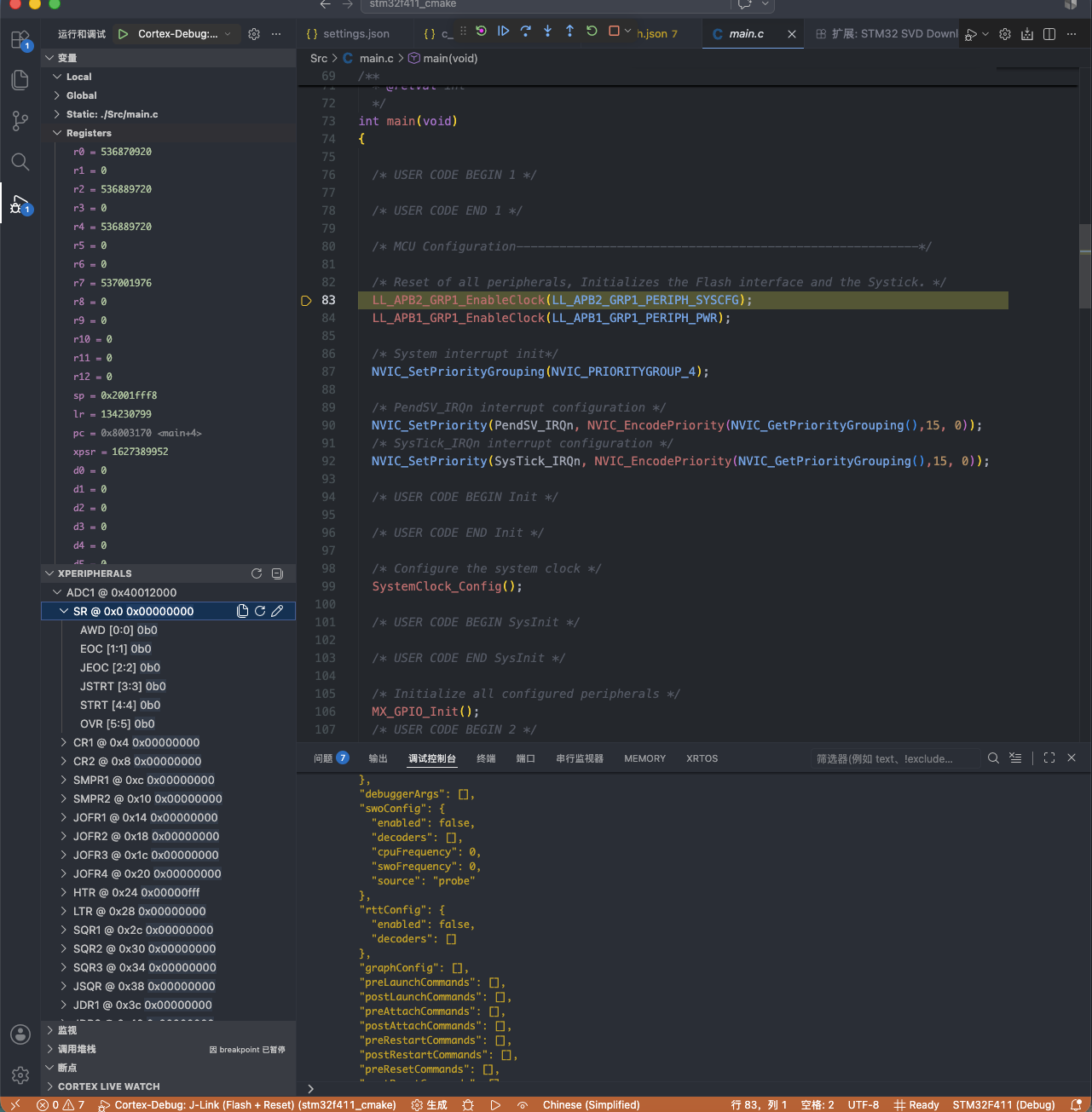
期望现象:

  • 调试工具栏出现(▶ ❚❚ ▶▶ 等按钮)
  • 左侧 VARIABLES 面板显示当前作用域变量
  • 底部状态栏变橙色(调试中)
  • 源代码 main() 那一行高亮(停在那里)

* debug 示意

6. 参考

6.1 工具链

6.2 工程生成

  • STM32CubeMX — 图形化配置 + 一键生成 CMake 工程

6.3 VSCode 集成

6.4 调试